
Deepdub speech provider
A Deepdub speech provider lets Live Hub use your Deepdub account for text-to-speech (TTS), through its Emotional Text-to-Speech (eTTS) service.
Adding the provider requires a region and the API key from the Deepdub platform. Deepdub's advanced configuration parameters can be set at either of two levels:
- Provider level: Enter the parameters in the 'TTS configuration' field. A parameter set on the provider applies to every bot connection that uses the provider.
- Bot connection level: Enter the parameters on the bot connection's Advanced tab. A parameter set on a bot connection applies to that connection only.
If the same parameter is set at both levels, the bot connection value takes precedence.
Add a Deepdub speech provider
To add a Deepdub speech provider:
-
From the 'Deepdub region' drop-down list, select the region.
-
In the 'Authentication Key' field, enter the API key from the Deepdub platform.
-
Optional: In the 'TTS configuration' field, enter the advanced configuration parameters that apply to every bot connection using this provider. See Configure advanced parameters at the provider level.
-
Click Create.
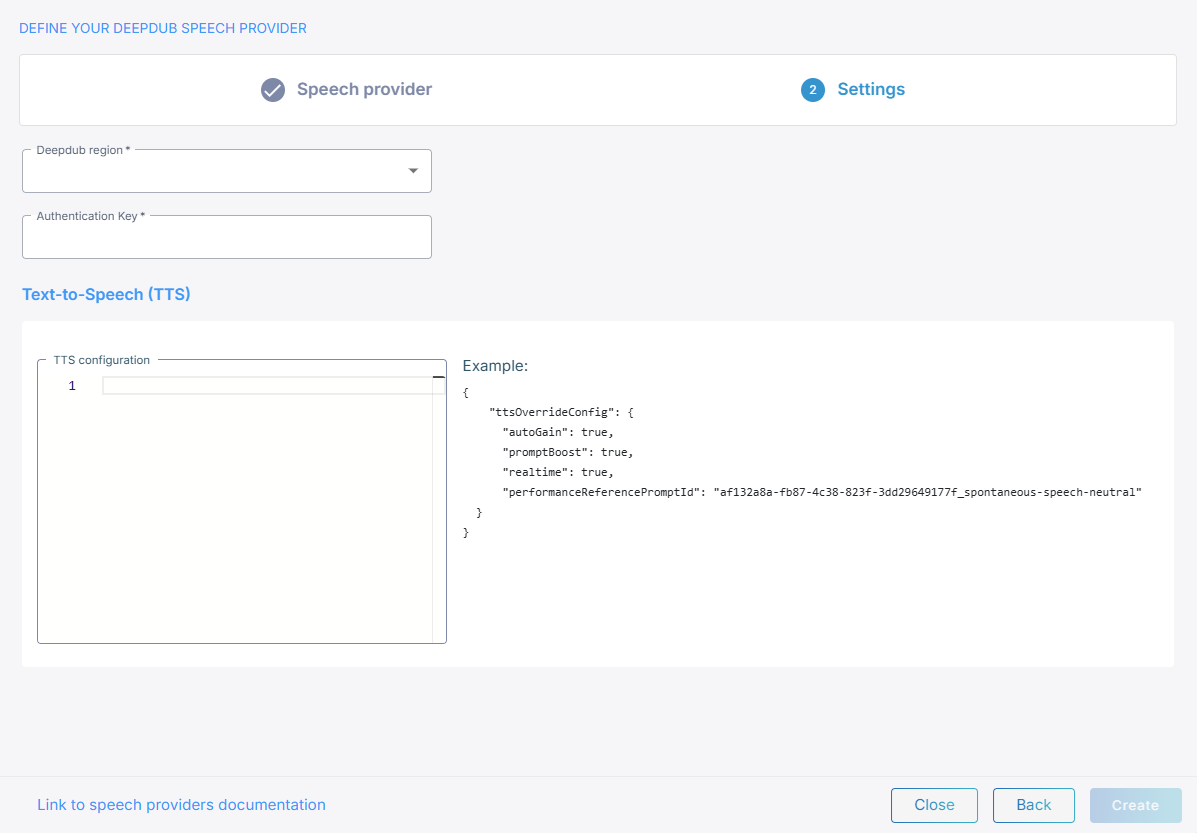
Configure advanced parameters at the provider level
The JSON you enter in 'TTS configuration' is merged into connection establishment request Live Hub sends to Deepdub, and applies to every bot connection using this provider. The full set is the request parameters in Deepdub's API documentation.
{
    "tempo": 1.2
}
The editor validates what you type against Deepdub's schema, so it flags an unknown parameter name or a wrong value type before you save.
Configure advanced parameters at the bot connection level
You can set the same parameters on a single bot connection rather than on the provider,
under ttsPassthruConfig in the JSON editor on the connection's Advanced tab. See
Manage bot connections.
{
    "ttsPassthruConfig": {
        "tempo": 1.2
    }
}
Language, model, and voice
You select the language, the model, and the voice per bot connection, on its Settings
tab, not on the provider. See
Manage bot connections. The
voice is a Deepdub voice-prompt identifier, which Live Hub passes on as voicePromptId.